
Cybersecurity Admin Console
✨
Cybersecurity Admin Console ✨
Info. Architecture (IA) Case Study
Creating a More Usable Navigation for Security Admins in a Cybersecurity WebApp

🔎 Research Categories: Exploratory, Evaluative
📝 Project Type: Information Architecture
🕵️♀️ Role/Contribution: Research Lead, Information Architect, UX Writer, UX Strategist
🗓️ Timeline: 3 months
🛠️ Relevant Tools: Optimal Workshop, FigJam, Figma, Amplitude
🤝 Cross-Functional Team: UX Researcher, UX Manager, UX Designer, Product Manager
👥 Stakeholder Teams: UX, Product, Engineering, Support, Sales, Product Marketing, Marketing
🔒 Users: 3K+ monthly active users (targeting security admins)
*Note: The visuals on this page were created for this case study.
🎯 Business Outcomes:
Reduce the number of customer success/service calls related to this admin console by developing a more intuitive admin console organization that decreases the frequency of navigation-related support tickets and enables customers to find what they need without assistance
Increased feature adoption rates by creating a more logical information architecture that highlights the full capabilities of the platform, ensuring customers are aware of and can easily access valuable features they're already paying for but may not be utilizing
🥅 High-Level Research Objectives:
Understand who currently uses the product and how many of those users are admins
Gather information from various stakeholders to determine the product's future objectives
Learn how security admins want and expect a cybersecurity product’s admin console to be organized
Jump to…
Project Context
Problem Statement
As our admin console continues to grow over time, we need to better understand the mental model of security admins in order to create a navigation that is more usable and navigable for them.
Hypothesis
We can make our product more usable for security admins by focusing on and updating the information architecture. We believe that usage will increase if the product is more usable and valuable for our users.
Research Goals
Understand the specific functionalities that are missing for people in the product currently.
Uncover the types of people who want to use the product UI vs. API and why.
Discover which admin tools security admins like and dislike using and why.
Actionable Insights
-
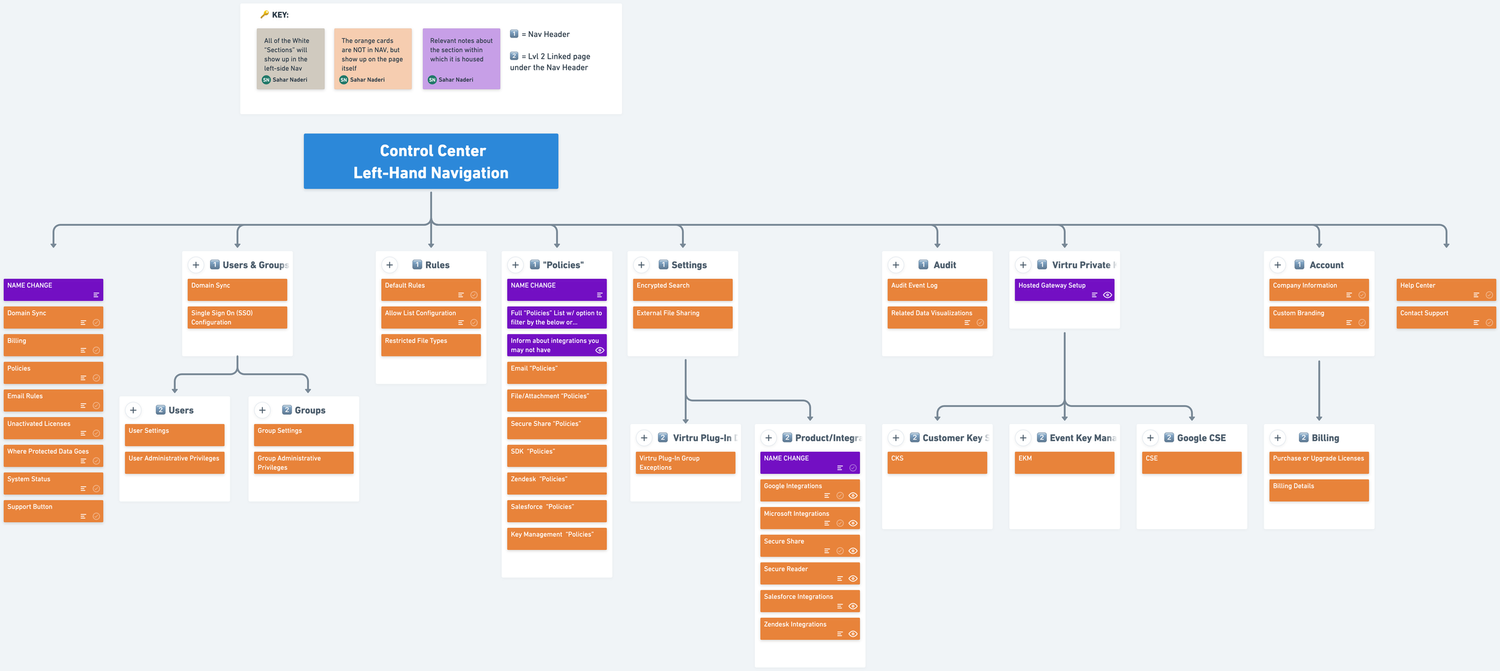
Research revealed that security admins primarily use Virtru for monitoring capabilities, usage data, and user activations, yet they had to navigate through multiple sections to access this information. All interviewed customers expressed excitement about having a dashboard that would provide quick access to these core tasks. As the product continues to expand with features like billing and advanced data visualizations, a dashboard becomes even more critical to prevent navigation complexity from scaling alongside feature growth. This insight led to dashboard becoming our top priority in the product roadmap, moving immediately into the design phase where we explored data visualization options and began paper prototyping solutions.
-
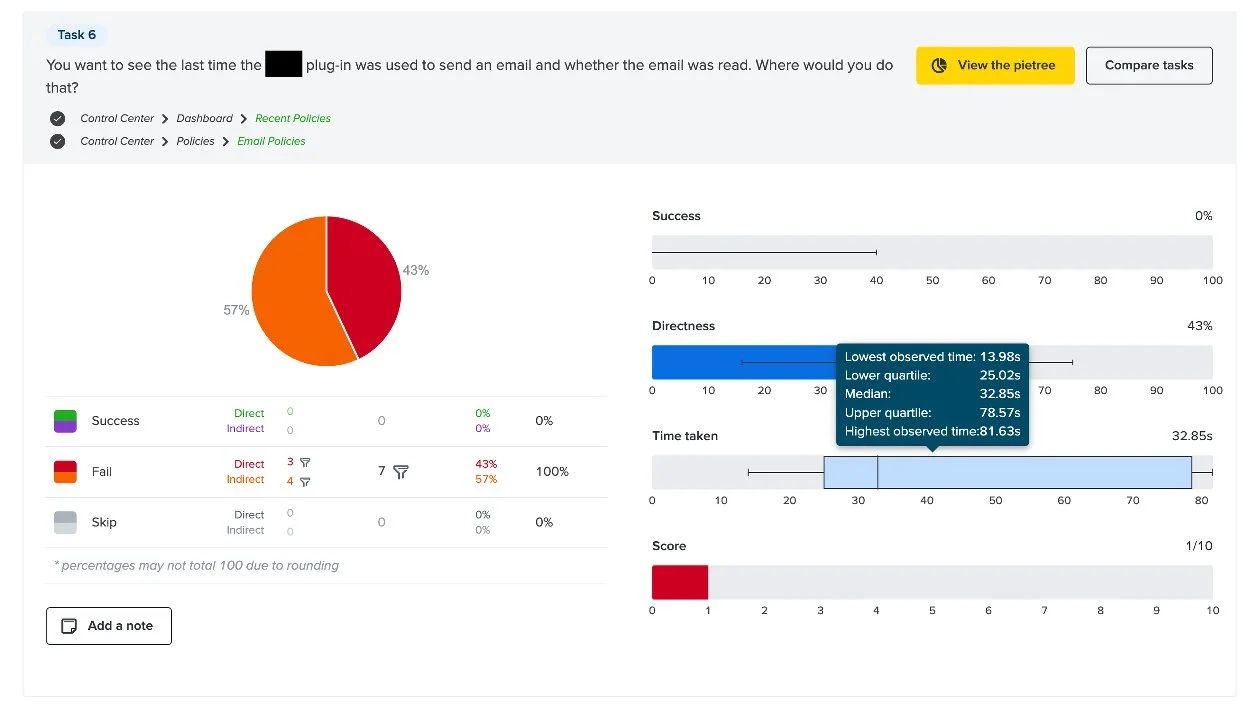
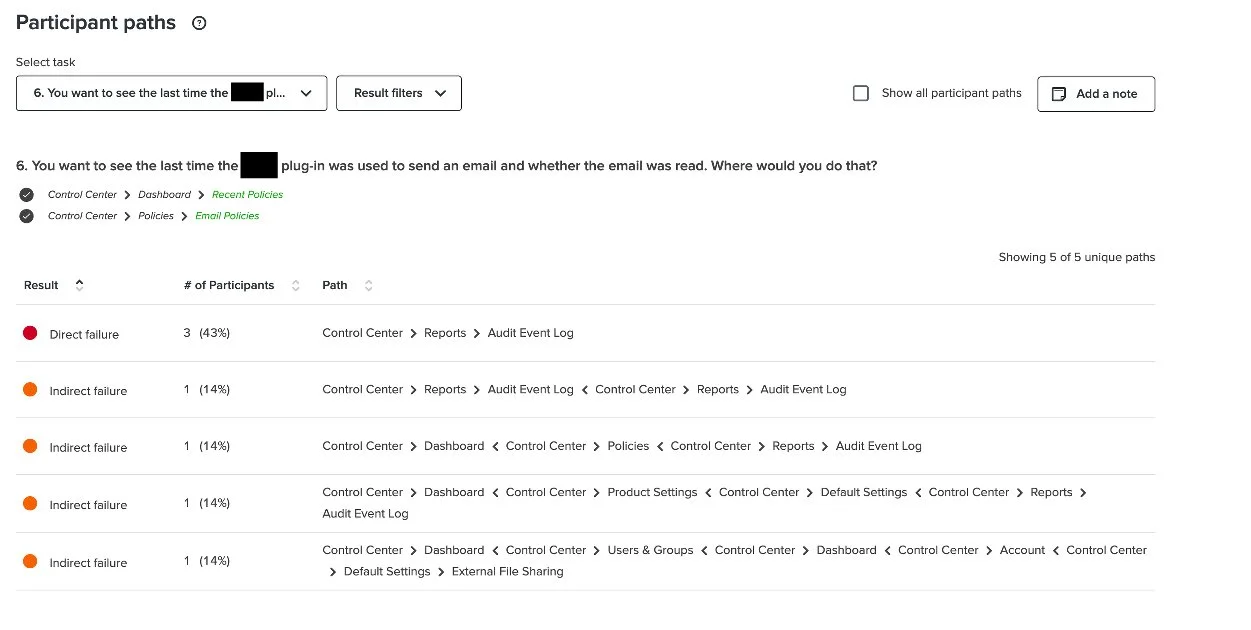
100% of customers failed the tree test task related to finding where they could view their last data encryption event, with many expecting to find it under an "Audit" section rather than "Policies." Our customer support team confirmed that this confusion stems from Google Workspace (a product Virtru integrates with) using "policies" and "rules" interchangeably, creating conflicting mental models. While "policies" remains useful as an internal term, customer-facing materials needed clearer language. Working with Marketing and Product Marketing, we facilitated a cross-functional renaming initiative, ultimately deciding to rebrand the "Policies" section as "My Data" and monitor usability from there.
-
Tree testing revealed that users expected an Audit Event Log feature when looking for encryption event history. Customer interviews confirmed this need. Approximately 50% of participants described manually generating audit reports by conducting custom searches and exports from the Users & Groups or "Policies" sections, with many assuming "Policies" already was their audit section.
This insight elevated Audit to our second roadmap priority, informing plans for dedicated audit research to understand current self-audit workflows and explore automation opportunities. Our SVP of Product & Engineering identified potential to automate the data exports users were already creating manually, reducing administrative burden while improving data accuracy.
“I would think Rules are maybe what triggers what is permissible to send out and what is not? Versus Policies would be more about maybe the structure of the rules?”

Business Impact
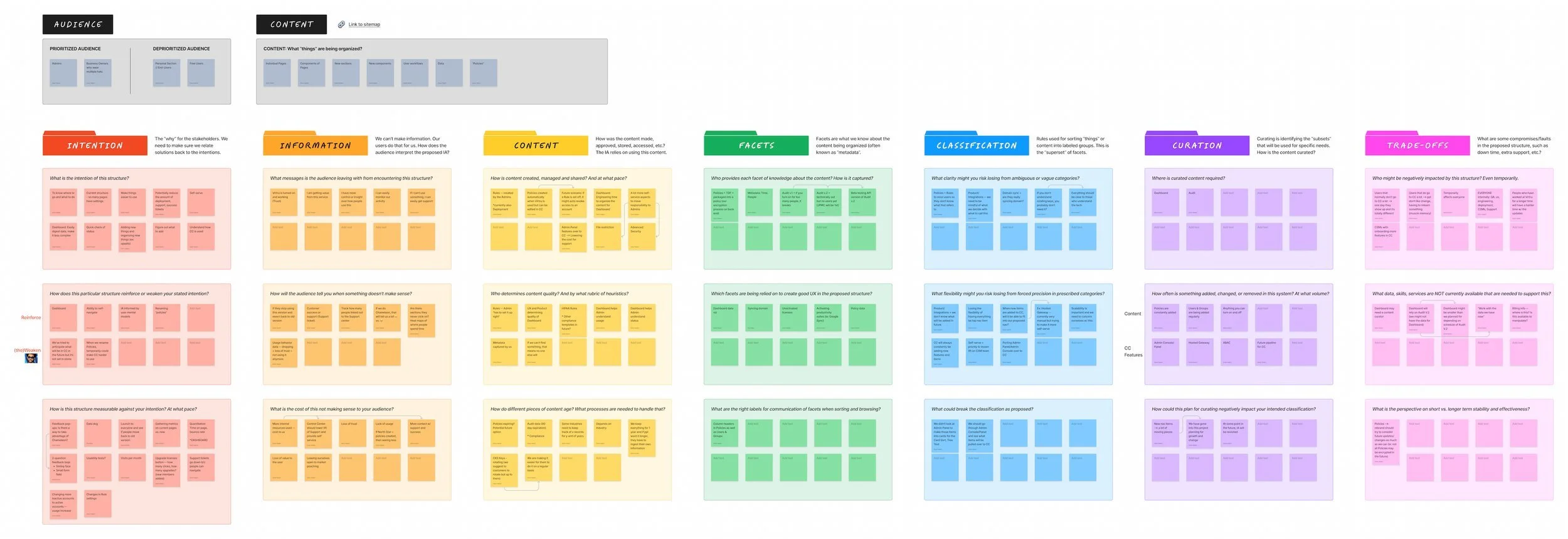
Research sessions doubled as discovery opportunities, generating immediate upsell conversations and creating a self-service pipeline for future revenue growth.
While the admin console itself doesn't directly generate revenue (it's an overview tool included with any product purchase), the research process uncovered significant upsell potential. During card sorts and tree tests, customers discovered upcoming features, integrations, and capabilities for the first time, creating organic excitement and anticipation. I facilitated multiple connections between interested customers and their customer success managers, converting research sessions into immediate business opportunities.
Three discoveries drove particular upsell interest:
Integrations: New and upcoming integrations with products like Zendesk generated excitement from customers already using those tools. The promise of seamless integration with their existing workflows proved highly attractive.
Billing: Approximately 50% of customers expressed enthusiasm about the new self-service Billing section, which enables license monitoring and easy purchase of additional seats without requiring a sales conversation.
Custom Branding: Originally positioned as an Enterprise-only feature, custom branding garnered unexpected interest when customers discovered it during research sessions. By strategically placing it within the new navigation schema to improve discoverability, we created opportunities for mid-market upsells to customers who hadn't previously known this capability existed.
Research Impact
Strategic Impact
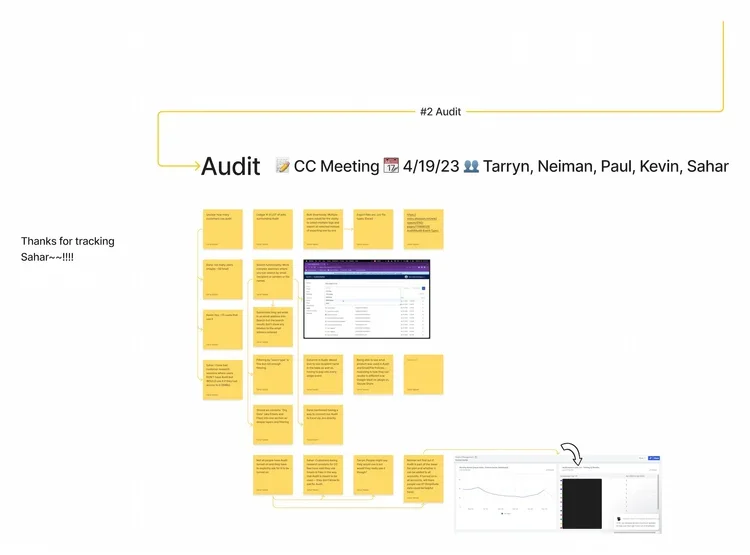
This research established a 2-3 year product roadmap that positioned UX ahead of Engineering, preventing design from becoming a bottleneck as the product scales.
After synthesizing insights with the core team, we used a prioritization matrix to create a phased implementation plan for Q3-Q4 and beyond. Recognizing that comprehensive information architecture changes can't happen overnight, we mapped a strategic roadmap that anticipates product growth and ensures UX work stays ahead of development cycles. This represented a larger organizational shift toward proactive design planning rather than reactive responses to engineering timelines.
My immediate next step was partnering with our UX Designer and Engineering team to implement DataDog tracking for newly rolled-out features. We balanced ideal-state data needs against engineering effort, ultimately aligning on three high-priority metrics to track upon initial implementation. This measurement strategy ensured we could validate design decisions with real usage data and iterate based on evidence rather than assumptions.
User Impact
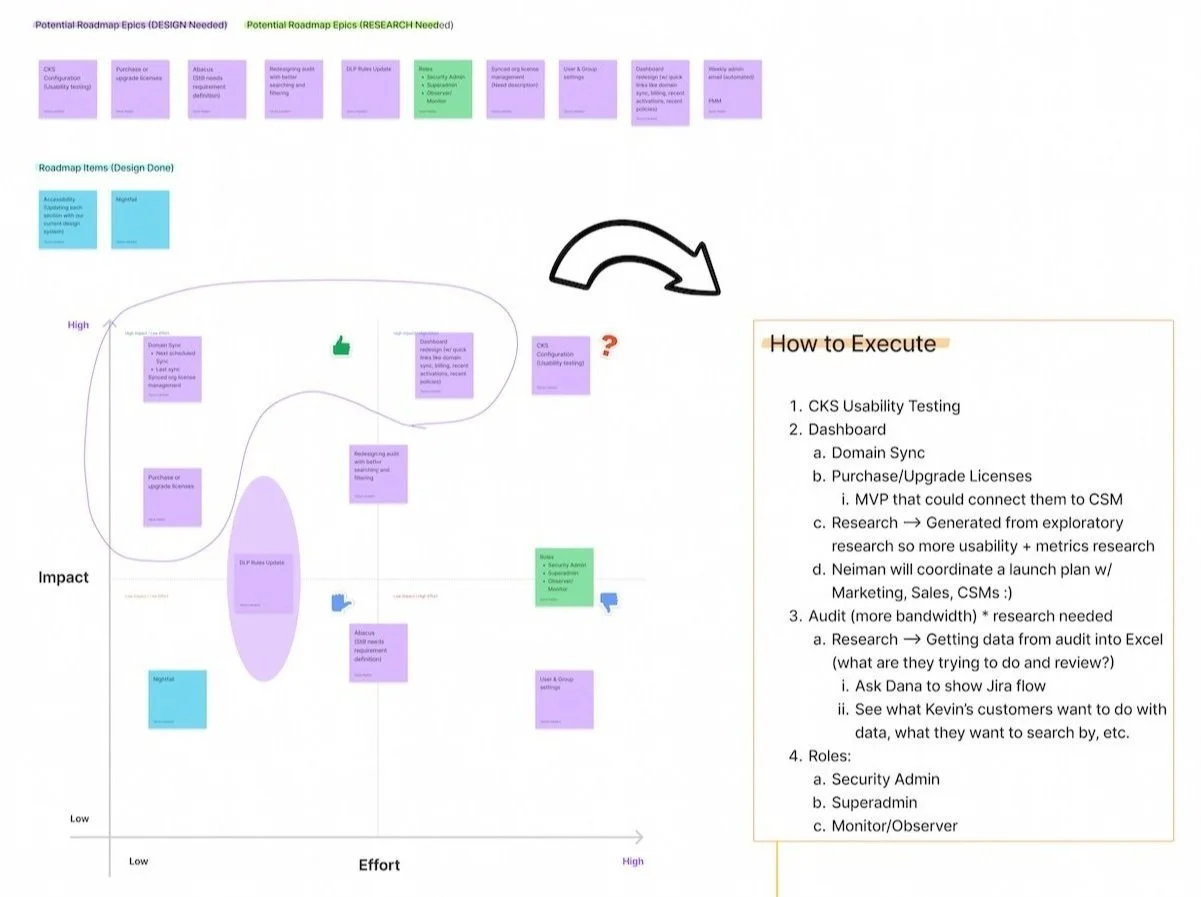
Security admins gain clearer pathways to critical tasks, reducing cognitive load and aligning the product with their existing mental models.
The dashboard provides security admins with an at-a-glance view of their data, eliminating the need to navigate multiple sections for routine monitoring tasks and reducing mental overhead. Renaming "Policies" to align with terminology from integrated tools like Google Workspace removed a major source of confusion, allowing users to find what they need without fighting against conflicting mental models. Understanding how users currently self-audit through workarounds positioned us to design a dedicated Audit experience that delivers the information they care about quickly and easily, rather than forcing them to cobble together reports from disparate sections.
Key Methodologies
-
Before diving into any research project, I always facilitate a problem-scoping exercise with relevant cross-functional partners and/or stakeholders (now available as a template on Figma Community). This collaborative brain-dump helps us fine-tune our problem statement and surface constraints, assumptions, and capabilities that will shape the research approach.
By painting a clear picture of the project landscape upfront, I can determine which methodologies are most appropriate and ensure alignment before investing in research.
-
I conducted card sorting in two strategic phases to balance internal expertise with customer perspectives. First, I ran open card sorts with internal proxy users (customer success managers and support team members) to leverage their deep knowledge of customer pain points and usage patterns. This internal round helped identify confusing labels and navigation issues before engaging customers.
Subsequently, I conducted hybrid card sorts with customers, allowing them to name groups themselves while working with researcher-defined categories. This approach ensured the final information architecture reflected both organizational knowledge and authentic user mental models.
-
Following card sorting, I validated the proposed navigation structure through tree testing using our updated sitemap. This allowed me to measure findability and assess whether users could successfully locate key features within the new architecture. By simulating realistic scenarios and identifying usability issues early, we could refine the structure before moving into design and development, preventing costly post-launch navigation problems.
-
To evaluate and compare our IA options strategically, I facilitated a "Structural Argument" activity inspired by Abby Covert's framework for building effective IA rationales.
Using a FigJam template I created (now publicly available on my Figma Community page), the core team reflected on navigation choices, strengthened our storytelling, and identified constraints or information gaps (such as available metadata for dashboard design). This collaborative exercise ensured we could present our IA proposal with confidence and clear justification for our decisions.
-
Drawing on my visual design and illustration background, I led collaborative sketching sessions to bridge research insights and design exploration. Sketching allowed the team to visualize complex concepts quickly, ideate on navigation patterns, and communicate ideas that would have been difficult to articulate verbally. This hands-on approach promoted active collaboration across disciplines and generated innovative solutions that emerged directly from research findings rather than assumptions.


Reflections & Learnings
-
Building a customer recruitment system requires persistence, relationship-building, and creative resourcefulness.
Without an established research operations infrastructure, I had to construct a recruitment pipeline from scratch. This meant partnering closely with Customer Success and Support teams (sometimes being "borderline annoying" to stay top-of-mind), consulting with our Product Manager about customer relationships, learning from UX teammates' past recruitment approaches, and even teaching myself Amplitude to identify high-value research participants based on usage patterns. This multi-pronged approach not only solved the immediate recruitment challenge but established repeatable pathways for future customer research that other teams could leverage.
-
Comprehensive documentation transforms research from deliverables into durable organizational assets.
When our Product Manager was laid off just as the project concluded, our thorough documentation (particularly the Structural Argument artifact) became critical infrastructure. Rather than research insights living only in my head or a few slide decks, we had comprehensive rationale, decision frameworks, and strategic context documented throughout the project lifecycle. This enabled our new PM to onboard quickly and maintain momentum without needing to reverse-engineer our thinking. The lesson: documentation exists as insurance against organizational disruption and a multiplier for research longevity.
-
Product research and generative research require fundamentally different operating rhythms, and recognizing this distinction helps optimize each.
Product research demands tight collaboration loops with cross-functional partners, such as frequent check-ins, alignment sessions, and iterative feedback that naturally lead to more meetings. Generative research, by contrast, benefits from longer stretches of independent deep work interspersed with strategic stakeholder touchpoints. Understanding these different cadences allowed me to structure my time appropriately.